The Ultimate Guide to Smart Home Gadgets and Devices
Discover the ultimate guide to smart home gadgets and devices in 2026. Learn what to buy, how to set it up, and which products are actually worth your money.
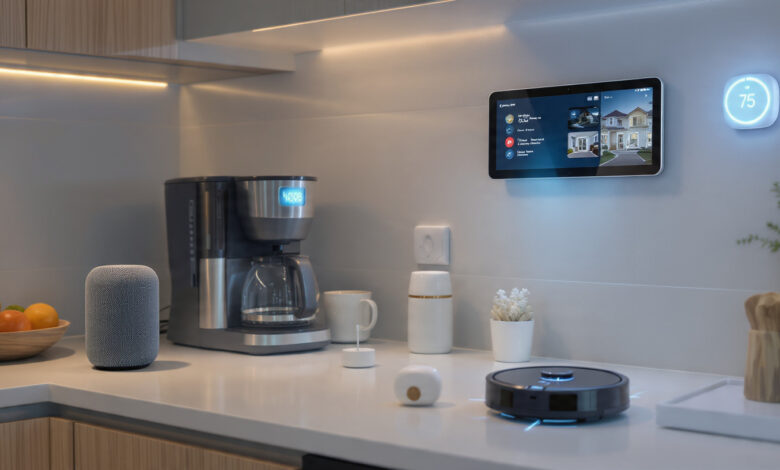
Smart home gadgets and devices have gone from a luxury tech novelty to a genuine part of everyday life. A few years ago, telling your lights to turn off felt like a party trick. Today, it is a basic expectation. In 2026, the smart home market is on track to surpass $139 billion globally, and nearly half of all U.S. households have adopted at least one connected device. That is not a trend anymore — that is a shift.
But here is the problem: the market is enormous and noisy. Walk into any electronics store, open any tech blog, and you are hit with hundreds of options across dozens of categories. Smart speakers, smart thermostats, robot vacuums, video doorbells, AI-powered locks, connected light bulbs — the list goes on. Knowing where to start, what to prioritize, and what to skip is genuinely hard.
This guide cuts through the noise. Whether you are setting up your first connected home or expanding an existing home automation system, you will find clear, practical advice on every major category of smart home technology. We break down how each device type works, what to look for when buying, which products are leading the pack in 2026, and how to build a system that actually holds together over time.
No jargon overload. No vague recommendations. Just everything you need to make smart decisions about building a smarter home.
What Are Smart Home Gadgets and Devices?
Smart home gadgets are internet-connected devices that can be controlled remotely, automated based on schedules or triggers, and integrated with other devices to create a seamless home automation experience. They communicate through wireless protocols such as Wi-Fi, Zigbee, Z-Wave, Bluetooth, and the increasingly important Matter protocol.
What sets modern smart home devices apart from older “smart” tech is interoperability. Thanks to the Matter standard — backed by Apple, Google, Amazon, and Samsung — devices from different brands can now talk to each other without requiring multiple apps or hubs. You can mix a Philips Hue bulb, a Yale smart lock, and an ecobee thermostat in the same setup and control all three from a single app.
Why the Matter Protocol Matters
Before Matter, the smart home world was fragmented. You had products that only worked with Alexa, others that required Google Home, and some that demanded their own proprietary hub. Matter-certified devices changed that. The protocol operates locally (not just in the cloud), which means faster responses, better reliability, and continued functionality even during internet outages.

If you are starting fresh or expanding your setup in 2026, prioritizing Matter-compatible hardware is one of the smartest things you can do for long-term peace of mind.
The Major Categories of Smart Home Devices
1. Smart Speakers and Displays
The smart speaker is still the most common entry point into the smart home ecosystem. Devices like the Amazon Echo, Google Nest Audio, and Apple HomePod mini act as voice-controlled command centers for your entire setup.
Smart displays take this a step further. The Google Nest Hub Max and the Amazon Echo Show 15 add screens to the equation, giving you a dashboard for your home — live camera feeds, weather, calendars, and smart device controls, all visible at a glance.
What to look for:
- Compatibility with your existing ecosystem (Alexa, Google Assistant, or Apple HomeKit)
- Built-in smart home hub functionality
- Display size if you want visual control
- Audio quality if music is a priority
Top picks in 2026:
- Amazon Echo Show 15 — best for Alexa households
- Google Nest Hub Max — best for Google Home users
- Apple HomePod mini — best for iPhone and HomeKit users
The smart speaker market got a significant upgrade in 2026 with the rollout of Alexa+, which brings generative AI to the Echo lineup. Instead of rigid command parsing, Alexa+ understands natural conversation, making voice control significantly more intuitive than it has ever been.
2. Smart Lighting
Smart lighting is often the first upgrade people make, and for good reason. It is affordable, easy to install (most smart bulbs just screw into existing fixtures), and immediately useful. You can dim lights without a dimmer switch, change colors to set a mood, automate your lights to turn on at sunset, or create scenes that trigger across your whole home with a single command.
Philips Hue remains the benchmark for quality and ecosystem depth. Their bulbs require a hub but offer the widest range of compatible accessories and the most reliable performance. For budget-conscious buyers, TP-Link Kasa smart bulbs are a consistently praised alternative — no hub required, reliable connectivity, and a clean app experience for around $10 per bulb.
Govee has carved out a niche in ambient and accent lighting, with light strips and smart panels that sync to music, games, or movies. For bedrooms, entertainment rooms, or streaming setups, Govee products add visual drama at a reasonable price.
Key features to consider:
- Hub required vs. hub-free setup
- Color range (white-only vs. full RGB)
- Compatibility with your voice assistant
- Energy monitoring capabilities
- Scheduling and automation options
Smart lighting can reduce your home energy costs by 20–30% compared to traditional incandescent bulbs, especially when paired with motion sensors and automated schedules.
3. Smart Thermostats
The smart thermostat is one of the highest-ROI smart home investments you can make. According to the U.S. Department of Energy, a well-programmed smart thermostat can save homeowners around $150 per year on heating and cooling costs.
The ecobee SmartThermostat Premium and the Google Nest Learning Thermostat are the two gold standards. The Nest learns your schedule over time and adjusts automatically. The ecobee comes with a room sensor that measures temperature and occupancy in separate rooms, solving the common problem of uneven heating across a home.
What makes a smart thermostat worth it:
- Learning algorithms that adapt to your routine
- Remote control from a smartphone app
- Integration with your voice assistant and smart home hub
- Energy usage reports and efficiency recommendations
- Geofencing to adjust temperature when you leave or come home
Installation note: Most smart thermostats require a common wire (C-wire) for power. The ecobee includes a power extender kit for older systems, making it the safer pick if you are not sure about your wiring.
4. Smart Security Cameras
Home security cameras have become one of the most widely adopted smart home gadgets, and the options in 2026 are significantly more capable than even two years ago. Modern cameras offer 4K resolution, AI-powered person and vehicle detection, local and cloud storage options, color night vision, and two-way audio.
Indoor smart cameras like the Wyze Cam v4 offer excellent value for monitoring the inside of your home. At roughly $35, it punches well above its price point for image quality and app functionality.
For outdoor surveillance, the Arlo Pro 5S and Google Nest Cam (outdoor) lead the category. Both support 4K recording, smart detection alerts, and integration with broader smart home systems.
One of the most interesting developments at CES 2026 was the Defend 360 — a fully cellular security camera with 360-degree coverage that requires no Wi-Fi, no power outlets, and runs entirely on a built-in solar panel. For rural properties or locations where running power is impractical, this is a game changer.
Things to evaluate before buying:
- Resolution (1080p minimum, 4K recommended)
- Local vs. cloud storage
- Subscription costs for cloud features
- Night vision quality
- Motion detection accuracy (AI-based detection reduces false alerts)
- Matter compatibility for integration with your existing setup
5. Video Doorbells
The video doorbell sits at the intersection of home security and convenience. You can see who is at the door, talk to them, and even unlock a connected smart lock — all from your phone, anywhere in the world.
Ring Video Doorbell Pro 2 and the Google Nest Doorbell (wired) dominate this category. Both offer sharp video quality, head-to-toe person detection, and strong ecosystem integration. The Ring product makes the most sense if you are already invested in the Alexa ecosystem; the Nest Doorbell fits naturally into Google Home setups.
For renters or anyone who cannot hardwire a doorbell, battery-powered options from Ring and Arlo provide nearly the same functionality without the installation complexity.
6. Smart Locks
Smart locks have evolved considerably. The days of fumbling for your keys while holding groceries are over. In 2026, the best smart locks support keypad codes, fingerprint biometrics, smartphone proximity unlocking, and remote access via app.
Yale, Schlage, and August continue to offer the most reliable options. The August Wi-Fi Smart Lock is particularly popular because it mounts on your existing deadbolt, so you keep your existing keys as a backup and do not need to replace the hardware on the door.
At CES 2026, the Aqara U400 smart lock turned heads by supporting Apple’s ultra-wideband (UWB) technology, allowing the lock to detect your iPhone or Apple Watch within centimeters and unlock automatically as you approach. No tapping a button, no voice command — just walk up and it opens.
For the premium end of the market, the Lockin V7 Max made waves by eliminating batteries entirely, drawing power through an infrared optical module instead.
What to look for in a smart lock:
- Compatibility with your smart home ecosystem
- Backup entry method (physical key, keypad, or fingerprint)
- Z-Wave, Zigbee, or Matter support for hub integration
- Battery life (or battery-free solutions)
- Auto-lock functionality
- Tamper alerts
7. Smart Plugs and Energy Monitoring
Smart plugs are one of the easiest and most affordable ways to add automation to devices that are not natively smart. Plug a lamp, a coffee maker, or a fan into a smart plug, and suddenly you can schedule it, control it by voice, and monitor how much electricity it is consuming.
The Kasa Smart Plug EP25 and Eve Energy Smart Plug are well-regarded options that offer energy monitoring alongside basic scheduling. For homes looking to cut energy costs, this data is surprisingly actionable — you might discover an older appliance is pulling 300W on standby.
Smart plugs are also useful for home safety. They can cut power to appliances when you leave the house, and some models detect overheating or overload conditions and shut off automatically.
8. Robot Vacuums and Smart Cleaning Devices
If any smart home gadget delivers obvious, tangible value every single day, it is the robot vacuum. Setting it on a schedule and walking away while it cleans is a genuine quality-of-life upgrade.
iRobot Roomba, Roborock, and Ecovacs lead the category. The mid-range to premium models now combine vacuuming and mopping in a single unit, with self-emptying bases that mean you might only need to empty the dustbin once a month.
Roborock has been particularly impressive in 2026, with models that use AI-powered obstacle avoidance to navigate around charging cables, pet toys, and shoes with remarkable accuracy. Their mapping technology creates detailed floor plans of your home that you can view and edit in the app.
What to look for:
- Suction power (measured in Pascals — 2000Pa+ is solid for carpets)
- Mopping capability
- Self-emptying base
- Mapping and room-specific scheduling
- Pet hair performance
- App quality and voice assistant compatibility
IoT home devices like robot vacuum-mop combos have been shown to reduce active cleaning time by up to 70%, making them one of the most time-positive investments in the smart home category.
9. Smart Home Hubs and Controllers
All the individual devices above are useful on their own, but a smart home hub is what turns a collection of gadgets into a coordinated, automated system. Hubs allow you to create multi-device routines — like “Good Morning” turning on the coffee maker, raising the thermostat, and gradually brightening the bedroom lights, all with a single command.
Amazon Echo (with Alexa), Google Nest Hub, and Apple HomePod all serve as software hubs. For more advanced automation, dedicated platforms like Home Assistant (open-source, locally hosted) offer vastly more customization for those willing to invest the setup time.
Apple is expected to release the HomePad in 2026 — a device that blends the HomePod with an iPad-style display and is positioned to become the central control panel for Apple HomeKit users.
10. Smart Home Security Systems
Beyond individual cameras and doorbells, smart home security systems offer comprehensive protection that ties everything together. SimpliSafe, Ring Alarm, and ADT Self Setup are the most popular professionally-monitored options that also integrate with smart home platforms.
These systems typically include:
- A central hub with cellular backup
- Door and window sensors
- Motion sensors
- Smoke and carbon monoxide detectors
- A keypad or control panel
- Optional professional monitoring
The advantage of modern smart security systems over traditional alarm companies is flexibility. You can self-monitor (free), pay for professional monitoring, and add or remove devices as your needs change — all without a long-term contract in most cases.
How to Build a Smart Home from Scratch
Building a smart home does not mean buying everything at once. The most successful setups grow gradually, starting with a clear strategy.
Step 1 — Choose Your Ecosystem First
The single most important decision you will make is which smart home ecosystem to center your setup around. Your three main options are:
- Amazon Alexa — widest device compatibility, best for those who want maximum hardware choice
- Google Home — excellent for Android users and those invested in Google services
- Apple HomeKit — most privacy-focused, best for iPhone/Mac households, but fewer compatible devices
The good news is that Matter-certified devices work across all three, so choosing one ecosystem does not lock you out of using products from the others.
Step 2 — Start with High-Impact Devices
Do not try to automate your entire home on day one. Start with the devices that will have the most immediate impact on your daily life:
- A smart speaker or display as your control center
- Smart lighting in the rooms you use most
- A smart thermostat for energy savings
- A video doorbell for security and convenience
Step 3 — Add Security and Automation
Once the basics are in place, expand into security — cameras, a smart lock, and sensor-based automations. This is where the home automation experience really clicks. Lights turning on when you walk in the door, the thermostat adjusting when you leave for work, the lock engaging automatically at 10 PM — these routines compound into something genuinely useful.
Step 4 — Optimize Your Network
A common bottleneck people overlook: your router. Wi-Fi 6 or Wi-Fi 7 routers significantly improve the performance of smart home devices, especially in homes with 20+ connected gadgets. Upgrading your router before expanding your device count is a practical move that prevents a lot of frustration.
For large homes, a mesh Wi-Fi system from Eero, Google Nest Wifi Pro, or TP-Link Deco ensures consistent coverage across every room.
Smart Home Security and Privacy
Smart home security is not just about cameras and alarms — it also refers to the digital security of the devices themselves. Every connected device is a potential entry point for hackers, and the more devices you have, the larger your attack surface.
Best Practices for Keeping Your Smart Home Secure
- Use strong, unique passwords for every device and app
- Enable two-factor authentication wherever available
- Keep firmware updated — manufacturers regularly push security patches
- Use a separate Wi-Fi network (guest network) for your smart home devices, isolated from your computers and phones
- Disable features you do not use — if a camera has remote access you never use, turn it off
- Review app permissions regularly and revoke access for apps you no longer use
According to Consumer Reports’ smart home security guidance, evaluating data security is just as important as evaluating the hardware itself when choosing cameras, doorbells, and locks.
Energy Efficiency and Smart Home Automation
One of the most compelling benefits of smart home automation is energy savings. This is not just good for your wallet — it is good for the environment.
Smart thermostats alone can reduce HVAC energy use by 10–15%. Pair that with smart plugs eliminating standby power drain, smart lighting on automated schedules, and smart blinds that reduce solar heat gain in summer, and the cumulative savings are significant.
Energy-efficient smart home upgrades to prioritize:
- Smart thermostat with occupancy sensing
- Smart plugs with energy monitoring on high-draw appliances
- LED smart bulbs on automated schedules (off when no one is home)
- Smart power strips that cut phantom power from entertainment setups
- Smart sprinkler controllers that adjust watering based on weather forecasts
For a broader look at home energy efficiency and smart devices, the U.S. Department of Energy’s energy saver resources provide detailed guidance on maximizing savings through automation.
The Best Smart Home Gadgets for Specific Rooms
Kitchen
- Smart display (for recipes and timers)
- Smart coffee maker with app control
- Smart refrigerator with inventory tracking
- Smart plug for the slow cooker or toaster oven
Living Room
- Smart speaker or display as the hub
- Smart TV with voice control
- Smart lighting with color ambiance scenes
- Robot vacuum on a daily schedule
Bedroom
- Smart thermostat with sleep scheduling
- Smart lighting with sunrise alarm scenes
- Smart lock for doors leading to the space
- Smart air purifier with air quality monitoring
Entryway and Exterior
- Video doorbell
- Smart lock with fingerprint or UWB proximity unlock
- Outdoor security cameras
- Smart lighting with motion triggers for the driveway and porch
Smart Home Trends to Watch in 2026 and Beyond
The smart home technology landscape is moving fast. Here are the trends shaping the next few years:
1. AI-Powered Personalization Devices are moving beyond scheduled automation toward truly adaptive behavior. AI models learn your patterns and make adjustments before you ask — preheating your home when your commute GPS shows you are 10 minutes away, or dimming the lights when your sleep tracker detects you have fallen asleep.
2. Generative AI Voice Assistants Alexa+ and Google’s updated Assistant bring large language models into everyday voice interaction. Instead of memorizing specific commands, you can speak naturally and get useful responses.
3. Battery-Free and Solar-Powered Devices Products like the Defend 360 solar security camera and the Lockin V7 Max battery-free lock point toward a future where maintenance headaches disappear. No more dead batteries at inconvenient moments.
4. Matter Becoming Universal More manufacturers are shipping Matter-certified products by default. The era of “works with Alexa only” is ending, which is good news for everyone building or expanding a smart home.
5. Health and Wellness Integration Smart home devices are increasingly incorporating health monitoring — air quality sensors, sleep trackers, and health scales that sync data across platforms. The home is becoming a passive health environment.
6. Local Processing and Edge AI Cloud dependency is decreasing. More smart home devices are processing data locally, which means faster response times, improved privacy, and functionality that does not break when the internet goes down.
Common Smart Home Mistakes to Avoid
Even experienced tech users make these mistakes when building out a smart home setup:
- Skipping compatibility research. Not every device works with every ecosystem. Always check compatibility before buying.
- Underinvesting in your router. A cheap router will undermine the performance of every connected device.
- Buying too fast. Start slow, see what you actually use, and expand deliberately.
- Ignoring security basics. Default passwords and outdated firmware are among the most common points of compromise.
- Over-automating. Complex automation routines that rarely trigger correctly become frustrating quickly. Simple, reliable routines beat elaborate ones.
- Not planning for power outages. Think about which devices need backup power to remain functional when the grid goes down.
Conclusion
Smart home gadgets and devices have matured into a genuinely useful, accessible, and interconnected ecosystem. With the right strategy — choosing a core ecosystem, prioritizing Matter-compatible devices, starting with high-impact categories like smart lighting, smart thermostats, and home security cameras, and building outward from there — anyone can create a home that is more comfortable, more efficient, and better protected. The home automation landscape in 2026 rewards thoughtful buyers who invest in compatibility and quality over novelty, and with AI, generative voice assistants, and battery-free hardware raising the bar across every category, the smartest time to build or upgrade your connected home is right now.